Android accounted for 34% of the 14.7 million smartphones sold in the U.S. last quarter, while RIM was 32.1% of the market and Apple was 21.7%. That's a huge victory for Google, which was zero two years ago. The game will change again when Windows Phone 7 hits the market.
Wednesday, August 11, 2010


Monday, June 28, 2010
Hitler Reacts to the iPhone 4 Antenna Issues
A hilarious parody created by Michael Ingram Jr.

You can watch more of Michael's videos here: http://mingramjr.com/
Friday, June 25, 2010
How To Properly Hold Your iPhone 4
Hours after its iPhone 4 went on sale to excited crowds Thursday, Apple found itself responding to complaints that holding the phone by its metal edge causes mobile reception to suffer.
The company's response, in a nutshell? You're holding it wrong!
The proper way to hold your new iPhone is illustrated below:

Read the full article: http://www.cnn.com/2010/TECH/mobile/06/25/iphone.problems.response/index.html?hpt=Sbin
Thursday, June 24, 2010
Phone Wars – Sprint Evo vs iPhone 4 (updated)
Based on some feedback from a very respected source, I’ve decided to update the format of this side by side comparison. Keep in mind that these ratings are simply “my humble opinion”.
Form Factor

The Evo (manufactured by HTC) is also very handsome. It is much larger than most Smartphones; which can be a bit of a turn off for most people. However, it doesn’t feel like a brick in your pocket. In fact, it fits really comfortably in your pocket and hand. It doesn’t feel as nice as the iPhone when holding it, but it is very close.
Winner= iPhone 4
Screen
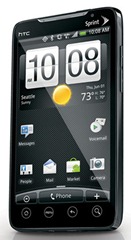
The iPhone has a much higher resolution and the screen is a thing of beauty. The lack of real-estate hurts the iPhone in this category.
Winner = DRAW
Interface
The Evo’s interface is pretty slick and intuitive. I found myself navigating and exploring the apps with no problem. All of the gestures that I’m used to doing worked well. In fact, the Dolphin browser allows you to use your own gestures to navigate web sites. Pretty cool. The Evo has support for animated and static background pictures. It also supports multi-tasking so you can have multiple apps going at once.
The interface is the familiar iPhone interface that we are all used to. Very responsive and very slick. There are some minor improvements such as support for background pictures and multi-tasking. One thing to note about multi-tasking is that the iPhone app has to be written to support it. Most of the iPhone apps out today do not support this. I’m sure this will change over time.
Winner = DRAW
Killer Features
Out of the box, the Evo has a few features that are really exciting:

1. Mobile Hot Spot
2. Live Television
3. Integration to Facebook
4. Support for widgets
5. HDMI output
The Mobile Hot Spot is really cool and is almost a must have for me. I like the idea of sharing my data plan with my laptop and having instant and secure Internet access anywhere I have data coverage. Sprint’s 4G network is also a whole lot faster than AT&T’s 3G.
Live Television is also very cool. The coworker that owns this particular Evo is watching the World Cup on his phone! How awesome is that?!! And the image looks great! The phone even has a little kick stand so that you can set it on your desk and watch comfortably. Very cool.
Integration to Facebook is a nice surprise. It ports over your contacts and shows their status without login into a Facebook app.
Widgets are cool. Widgets are apps that are always on. No need to open an app to interact with it. To use the Facebook widget, you simply glance at your phone to get an update.
HDMI output on the Evo means you can plug into your TV and watch videos you’ve recorded or Sprint TV on the big screen.
The iPhones biggest strength is its massive library of apps. We’ve all heard the term “there’s an app for that”. Well, it’s true. Integration with iTunes is either a plus or minus, depending on who you talk to.
Winner = Evo
Camera: Pictures and Video
The camera on the iPhone is lower in resolution (5 mp) than the Evo camera (8 mp). Both phones support video chat. However, the iPhone only supports video chat when it is connected to wifi. The Evo requires that you be connected to the 4G network. Both phones support HD video recording.

Battery Life
Personally, I don’t own either of the phones so I can’t speak on experience. I can only base this comparison on what people are reporting. So far, people say that the battery life on the Evo sucks. The faster 4G network and TV watching comes at a price. Fortunately, the Evo gives you the option to upgrade the battery. Not sure how much this will help, and I’m sure it will add more bulk to an already bulky phone. The iPhone 4 has better battery life.
Winner = iPhone
Network
The 4G network is definitely something to get excited about. It uses the Clear 4G network and it is much faster than the any of the existing 3G networks. The issue with it is that it is not available everywhere. You have to check and see if your city is covered. If it isn’t, you will only be able to run in 3G mode.
The AT&T service can be pretty bad at times. Again, this totally depends on the coverage. In my area, the service is pretty crappy. I have a lot of dropped calls. The data network is pretty solid and I haven’t had too many issues with it. My only gripe with it is that it can be slow at times.
Winner = Sprint (but it totally depends)
And the winner is…
Ultimately, both phones are very good options and you will most likely be happy with either purchase. If form factor is more important than 4G speeds, I suggest you go with the iPhone. If a fast network, TV and Mobile Hot Spot is are must have features for you, go with the Evo.
Final thoughts… There are a couple of factors you have to consider before making your selection and signing up for a 2 year contract.
1. Keep in mind that the Droid’s app library is growing. There will soon “be an app for that” on the Droid app store too.
2. There are other very exciting phones coming to a store near you very soon. The Windows Phones will soon be here and it looks like they will offer some very cool features like Social Networking integration and better enterprise/business support.
3. AT&T and Verizon will soon introduce their version of the 4G network. From what I’ve learned, the technology is far superior than Sprint’s. It will have bigger coverage than 3G and will penetrate buildings better due to its lower frequency. It also promises to be faster.
Windows Phone 7 teaser video… Here’s a preview of Windows Phone 7. Watch it to find out why I’m excited about this phone.

Friday, June 18, 2010
What’s The Most Popular Sport?
With the World Cup underway and an intense basketball season coming to an end with a Lakers victory yesterday, I started wondering what the most popular sport on the planet is. I did a quick search and came across a really interesting wiki page that ranked the most popular sports on the planet.
“Popularity” = Most watched, most fans and most played.
Most Frequently Cited Ranked Lists
1) Football/Soccer: 3.3-3.5 billion fans
2) Cricket: 2-3 billion fans
3) Field hockey: 2-2.2 billion fans
4) Tennis: Around 1 billion fans
5) Volleyball: Around 900 million fans
6) Table tennis: Around 900 million fans
7) Baseball: Around 500 million fans
8) Golf: Around 400 million fans
9) American football : 390-410 million fans
10) Basketball: Not more than 400 million fans
Answers from sportingo.com/answers.com/Wikipedia
1. Football/Soccer
2. Cricket
3. Rugby
4. Field Hockey
T5: Baseball
T5: Basketball
And there you have it…. Soccer is by far the most popular sport in the known universe.
Here’s a ranked list of my personal favorites:
1. American football
2. Basketball
3. Soccer
4. Fishing (yes, I like to watch people catch fish. LOL)
I think Soccer has the potential to move into the number two spot, but certain events have to occur.
1. I need to get more exposure to MLS. With Portland finally getting an MLS team next year, it will be much easier to get a dose of soccer.
2. We need the Portland MLS team to win matches. It’s much easier to follow a team that wins than one that gets beat time and time again.
3. My son needs to continue to play little league soccer. These games are a lot of fun to watch!
Thursday, June 17, 2010
The New Version of MS Office Is Free
Microsoft surprised the tech world recently when they announced that they are introducing a free online version of Office 14 (Office 2010). It offers Word, Excel, PowerPoint and OneNote with support for all popular web browsers. 
This is exciting news for anyone looking to save a little money. I will certainly take advantage of this going forward. I have several PCs at home and wasn’t looking forward to upgrading them all to the latest version. Especially for the systems that rarely get used for anything other than “consuming”.
Here’s a list of Office 14 features:
- Ribbon interface and Backstage View across all applications
- Background Removal Tool
- Letter Styling
- The Word 2007 Equation editor is common to all applications, replacing MS Equation 3.0
- New SmartArt templates
- New text and image editing effects
- Screen Capturing and Clipping tools
- Live collaboration functions
- Jumplists in Windows 7
- New animations in Powerpoint 2010
They are adding Office 14 to the Windows Live platform; which I find extremely useful. I’ve been using my Live Skydrive as my personal drive in the cloud. With Office 14, it will be a great way to collaborate with others since its easy to share files. It has a nice security feature that you can use to protect your files by assign permissions and access rights. This is a big win for consumers.
Here’s the URL: http://office.live.com/
Enjoy :)
Wednesday, June 16, 2010
Internet Explorer 8 and Parental Controls
I remember when my parents first signed up for cable television. Even though we didn’t have cartoons 24/7 like we have today, it was still really cool. Mature programming wasn’t an issue my parents ever had to worry about. They simply didn’t subscribe to adult channels and made sure we weren’t in front of the tube past 8 pm. Today, I see a trend where television and the Internet are converging. The television networks are encouraging viewers to go online to access special programming and enjoy interactive content. Due to this, my kids are requesting access to the laptop to visit Cartoonnetwork.com. This has me a bit concerned as I don’t want my kids to get exposed to all of the evil content floating around in cyberspace. I think it’s important for my kids to go online, but I don’t want them to come across content that is not suitable for them. Although I supervise them while they are online, I came to the conclusion that it was best to take certain precautions… Time to enable Parental Controls to protect their innocent little souls.
Enabling the Parental Controls in IE 8 is pretty straight forward. I created an account for each of my two kid and set the content restriction level. I logged in as one of my kids and took it for a test drive. In no time at all I found myself extremely frustrated with the browser. Every time IE came across web content that it couldn’t determine to be safe, it popped open a dialog box prompting for the Parental Controls password. This got old really fast. It even prompted me for a password to get to cartoonnetwork.com. The browser couldn’t determine if that was a safe site. Really???
I convinced myself to continue testing… perhaps there was something weird about cartoonnetwork.com. Unfortunately, it wasn’t the site. I had the same experience at several sites. It prompt me for the password to enable certain sections of the front page. The banner adds needed approval. The embedded video content needed approval. The embedded games needed approval. Just about every section of the site was sourced from some other site and it all needed approval. But wait, there’s more…The deal breaker came when I logged off from my kid’s account and logged back in with an admin account. I opened up a browser window to test the experience. Sure enough, the parental controls were being applied to this account. I couldn’t even visit my banking site without being prompted for the Parental Control password. The parental control setting is a “one size fits all” approach. I had no choice but to disable Parental Controls. I’m going to have to give IE Parental Controls a big “TWO THUMBS DOWN”.
Note to Microsoft: Make Parental Controls for IE smarter. Take into account the banner adds and embedded content that is found in 99.9% of all web sites. Make it so that we can assign each user a unique level of content management to improve the overall experience.
Subscribe to:
Posts (Atom)